
Understanding DNS, Domain Names, and Web Hosting
The internet can feel like a complex and mysterious system, but at its foundation are three essential concepts: domain names, DNS, and web hosting. Understanding these pillars is key to knowing how websites work. This guide explains each of these components in clear, simple language, showing how they work together to make the web accessible to everyone.
Introduction: The Three Pillars of the Web
Every website you visit relies on three interconnected systems: a domain name, DNS, and web hosting. The domain name is the human-readable address you type into your browser. DNS translates that name into a machine-friendly IP address. Web hosting provides the server space where the website's files are stored. Together, they make it possible for you to access content on the internet without needing to remember complex numerical IP addresses or manage server hardware. This guide is intended for beginners, providing a solid foundation in these core web technologies.
Domain Names: Your Website's Address
A domain name is essentially the address of your website on the internet. It allows users to find your site easily by typing a memorable name rather than a numerical IP address. Understanding domain names is important for anyone creating a website.
- What is a Domain Name? A domain name is a human-readable text string that maps to an IP address. For example, 'example.com' is a domain name. It is easier to remember and communicate than a string of numbers like 192.0.2.1.
- Components of a Domain Name: A domain name typically consists of two main parts. The second-level domain is the unique name chosen by the owner, such as 'example.' The top-level domain (TLD) is the extension, such as '.com,' '.org,' '.net,' or country-specific TLDs like '.uk.'
- Registering a Domain Name: Domain names are registered through domain registrars. Registration involves checking if the desired domain is available and purchasing the rights to use it for a specific period, usually renewable annually.
DNS (Domain Name System): The Internet's Phonebook
The Domain Name System is often described as the phonebook of the internet. It translates the domain names we type into browsers into the IP addresses that computers use to locate and connect to each other.
- What is DNS? DNS is a distributed database that maps domain names to IP addresses. When you type a domain name into your browser, a DNS resolver queries various DNS servers to find the corresponding IP address.
- How DNS Works: The process begins when you enter a domain name. Your computer contacts a DNS resolver, which then queries root servers, TLD servers, and authoritative name servers to find the exact IP address for that domain. This is called a DNS lookup.
- DNS Record Types: Several types of DNS records exist, each serving a specific purpose. The 'A' record maps a domain to an IPv4 address, while 'AAAA' maps to an IPv6 address. 'CNAME' records map a domain to another domain name, and 'MX' records specify mail servers for email.
- DNS and Caching: To improve speed and reduce load on DNS servers, resolvers cache DNS records for a set period, called Time to Live (TTL). This means subsequent requests for the same domain can be resolved more quickly.
Web Hosting: Your Website's Home
Web hosting is the service that stores your website's files and makes them accessible to visitors on the internet. Hosting providers offer server space where your website resides.
- What is Web Hosting? Web hosting is a service that provides the technologies and services needed for a website to be viewed on the internet. Websites are hosted on servers, which are powerful computers that store website files and deliver them to users' browsers.
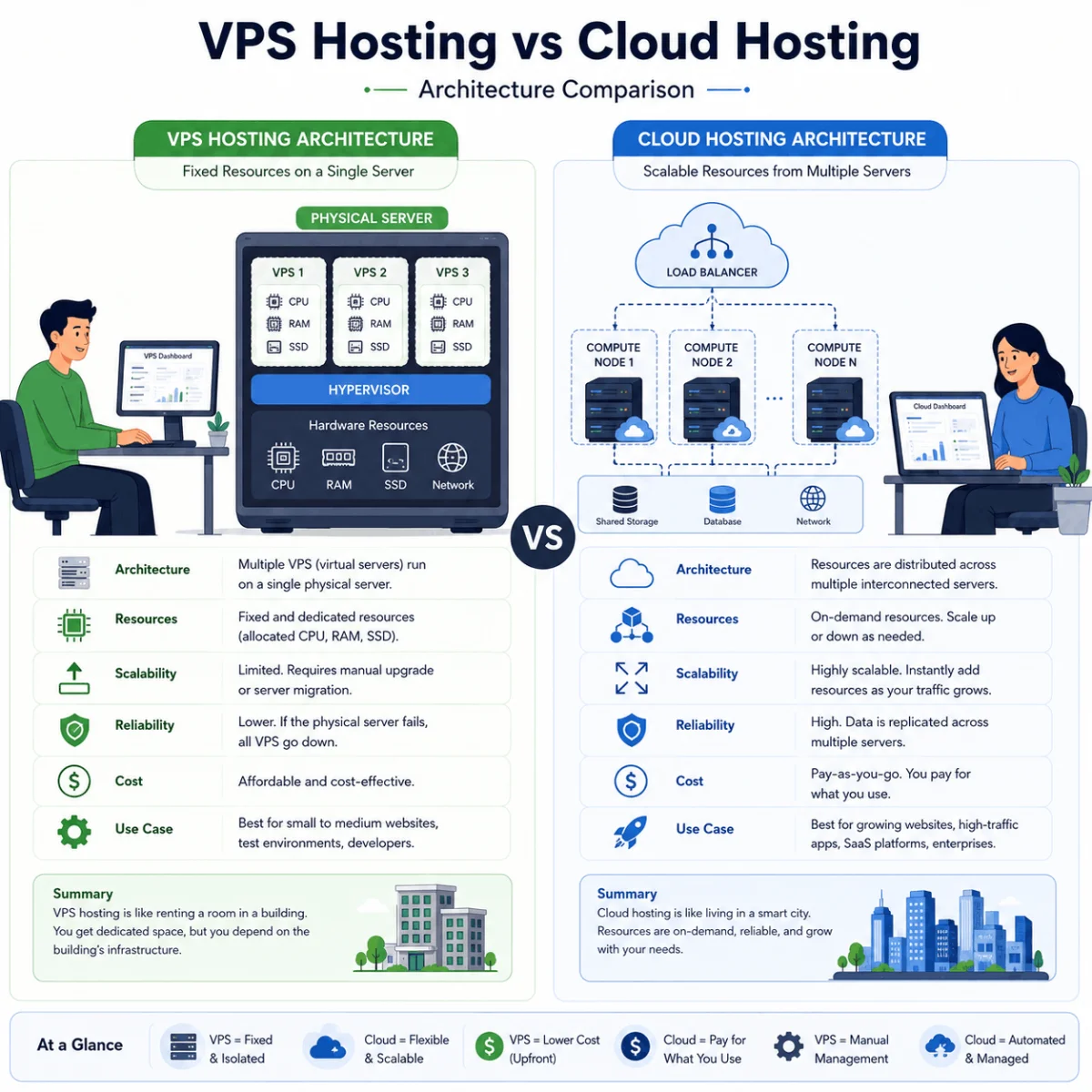
- Types of Web Hosting: Different hosting types are available depending on the website's needs. Shared hosting involves multiple websites sharing the same server, making it cost-effective for small sites. VPS (Virtual Private Server) provides dedicated resources within a shared environment. Dedicated hosting offers an entire server for one site, providing maximum performance and control. Cloud hosting distributes resources across multiple servers for scalability and reliability.
- Hosting Requirements: A website requires storage space for its files, bandwidth to handle traffic, and various technologies like server-side languages and databases depending on the site's functionality.
How DNS, Domain Names, and Web Hosting Work Together
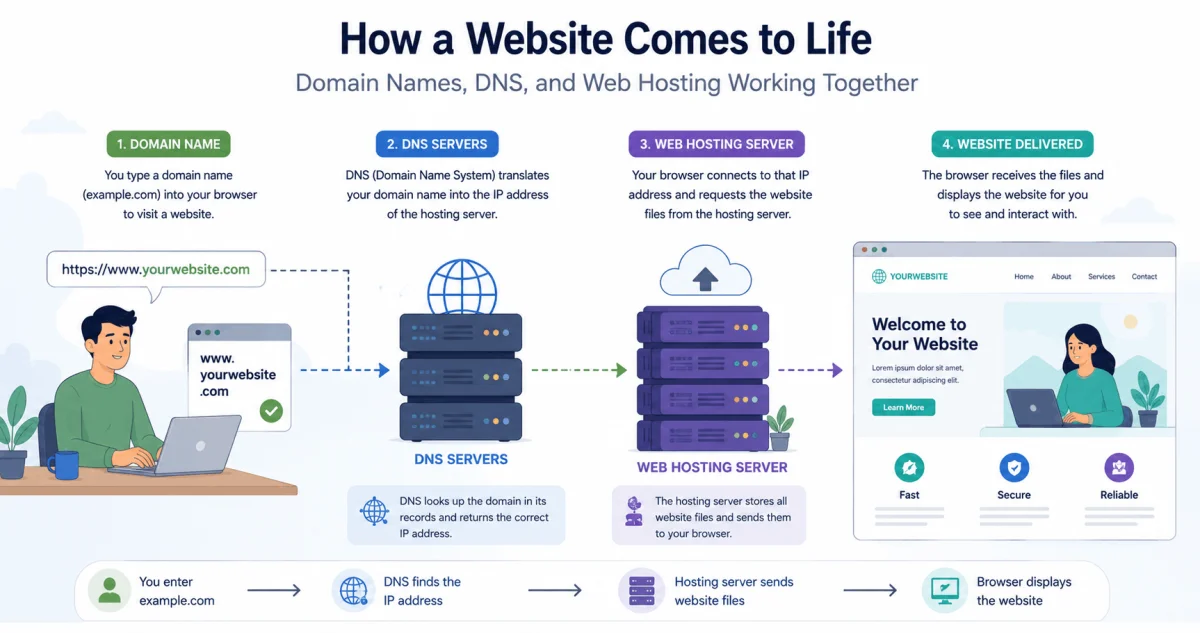
These three components work in harmony to make a website accessible. The process begins when a user enters a domain name in their browser. Here is how the pieces fit together.
- Step 1: User Enters a Domain Name: The user types 'example.com' into their browser.
- Step 2: DNS Resolution: The browser initiates a DNS lookup, translating the domain name into an IP address using the DNS system.
- Step 3: Connection to Server: The browser connects to the server with that IP address (the web hosting server) and requests the website's files.
- Step 4: Content Delivery: The web hosting server delivers the website files to the user's browser, which then renders the website for the user to see.
Comparison of Web Hosting Types
The following table compares the most common web hosting types, highlighting their key characteristics, advantages, and best use cases.
| Hosting Type | Resource Allocation | Cost | Control | Best For |
|---|---|---|---|---|
| Shared | Shared with others | Low | Limited | Small websites, blogs, beginners |
| VPS | Dedicated portion of server | Medium | High | Growing websites, moderate traffic |
| Dedicated | Full server | High | Full | Large sites, high-traffic applications |
| Cloud | Scalable, distributed | Variable | High | Sites requiring scalability and reliability |
Checklist: Choosing a Domain and Hosting
Use this checklist to guide your decisions when choosing a domain name and web hosting provider.
- For Domain Name Selection:
- Is the domain name easy to remember and type?
- Does it reflect your brand or website's purpose?
- Is the domain name available and not trademarked?
- Are you registering with a reputable registrar with transparent pricing?
- For Web Hosting Selection:
- What type of hosting best suits your needs and budget?
- Does the hosting provider offer sufficient storage and bandwidth?
- What is the provider's uptime guarantee and customer support availability?
- Does the hosting plan support the technology stack required by your website (e.g., PHP, databases)?
Tips for Managing Your Domain and Hosting
These practical tips can help you manage your domain and hosting setup more effectively.
- Keep Domain Registration and Hosting Separate: Register your domain with a separate, reputable registrar to avoid potential issues when switching hosting providers.
- Use Strong Passwords and 2FA: Secure your hosting and domain accounts with strong passwords and enable two-factor authentication to protect your digital assets.
- Monitor Expiration Dates: Keep track of domain renewal dates and hosting subscription renewals to avoid unexpected service interruptions.
- Regularly Back Up Your Website: Ensure your hosting provider offers automated backups, and keep your own backup copies as an additional safety measure.
Frequently Asked Questions About DNS, Domains, and Hosting
What is the difference between a domain name and web hosting?
A domain name is your website's address, while web hosting is the space where your website's files are stored. Both are needed to make a website accessible.
Do I need both a domain and hosting?
Yes, to have a website accessible on the internet, you need a domain name for users to find it and web hosting to store the files and serve them to visitors.
Can I transfer my domain to another registrar?
Yes, domains can be transferred between registrars, but there are specific processes and requirements set by ICANN. Usually, you'll need to unlock the domain and obtain an authorization code.
What is an IP address?
An IP address is a unique numerical label assigned to each device connected to a network. It is used for identification and location addressing on the internet.
What happens if my domain expires?
If a domain expires, you may lose access to it. There is often a grace period, but it can become available for others to register. It is important to renew your domain before it expires.
What is shared hosting?
Shared hosting is a web hosting service where multiple websites are hosted on a single server, sharing its resources. It is a cost-effective option for beginners.
How does DNS propagation work?
When you change DNS settings, it can take up to 48 hours for the changes to propagate across all DNS servers globally. This delay is due to DNS caching.
Can I have multiple domain names for one website?
Yes, you can point multiple domain names to the same website using domain aliases or redirects, helping protect your brand or capture different audiences.
What is a subdomain?
A subdomain is a part of a larger domain, such as 'blog.example.com'. Subdomains are often used to organize different sections of a website.
How does DNS caching work?
DNS caching is when DNS information is stored temporarily at various levels (browser, OS, resolver) to speed up the lookup process for previously visited domains.
Conclusion
Understanding DNS, domain names, and web hosting is essential for anyone looking to build a website or simply understand how the internet works. The domain name provides a human-readable address, DNS translates that address into an IP, and web hosting provides the server space to store and deliver your site's files. These three systems work together seamlessly to make the web accessible to everyone. By understanding the basics of each component and how they fit together, you can make more informed decisions about your own website presence and better appreciate the technology that powers the web.