

If you are building AI applications in 2026, you have likely faced the same integration problem: connecting your AI to external tools and data sources requires custom code for every new API. The Model Context Protocol (MCP) solves this problem by providing a universal, open standard for connecting AI applications to external systems.
Introduced by Anthropic in late 2024 and now donated to the Agentic AI Foundation, MCP has become the industry standard for connecting AI agents to tools and data. MCP's TypeScript and Python SDKs reached 97 million monthly downloads in March 2026, up from approximately 2 million at launch. Overall monthly MCP SDK downloads surpassed 400 million, representing a 200x growth since the protocol became generally available.
This guide explains what MCP is, why it matters, how it works, and what you need to know to use it.
What Is the Model Context Protocol?
The Model Context Protocol (MCP) is an open protocol that enables seamless integration between LLM applications and external data sources and tools. Whether you are building an AI-powered IDE, enhancing a chat interface, or creating custom AI workflows, MCP provides a standardized way to connect LLMs with the context they need to be truly useful.
MCP takes inspiration from the Language Server Protocol (LSP), which standardized how development tools add support for programming languages. In a similar way, MCP standardizes how to integrate additional context and tools into the ecosystem of AI applications.
The protocol uses JSON-RPC 2.0 messages to establish communication between hosts, clients, and servers. MCP consists of two layers:
- Data layer: Defines the JSON-RPC-based protocol for client-server communication, including lifecycle management and core primitives such as tools, resources, prompts, and notifications
- Transport layer: Defines the communication mechanisms and channels that enable data exchange between clients and servers, including transport-specific connection establishment, message framing, and authorization
The data layer implements a JSON-RPC 2.0-based exchange protocol that defines the message structure and semantics. All messages between MCP clients and servers must follow the JSON-RPC 2.0 specification.
Why MCP Matters: The Problem It Solves
Before MCP, integrating an AI application with external tools required custom code for each integration. Connecting an AI to a database, a file system, an email system, and a calendar meant writing separate integration logic for each one.
This approach had several problems:
- Vendor lock-in: Each integration was tied to specific APIs and authentication methods
- Maintenance burden: Each integration needed to be maintained as APIs changed
- Fragmentation: The AI ecosystem was fragmented, with no standard way for tools to expose their capabilities to AI
- Security inconsistency: Each integration handled authentication and authorization differently
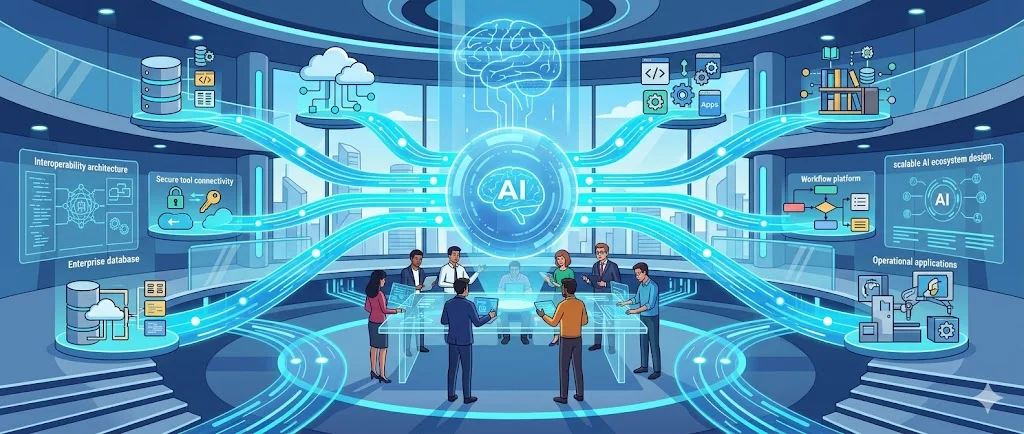
MCP solves these problems by providing a universal protocol. Tool providers implement MCP once, and any MCP-compliant AI application can use their tools. AI application developers implement MCP once, and they gain access to any MCP-compliant tool.
This is the same network effect that made LSP successful: a single standard that benefits both providers and consumers, creating an ecosystem rather than a collection of point-to-point integrations.
MCP vs Traditional API Integrations
Traditional API integrations require the AI application developer to write custom code for each tool or data source. The developer must understand each API's authentication method, request format, response structure, and error handling.
MCP replaces this with a standardized protocol. The AI application implements MCP once, and any MCP server—whether for a database, a calendar, an email system, or a custom business tool—can be integrated without additional code.
| Traditional API Integration | MCP Integration | |
|---|---|---|
| Integration approach | Custom code per tool | Universal protocol |
| Authentication | Varies by API | Standardized OAuth 2.1 or environment-based |
| Tool discovery | Manual documentation lookup | Automatic via tools/list |
| Message format | Varies (REST, GraphQL, etc.) | JSON-RPC 2.0 |
| Maintenance | Per integration | Protocol layer only |
| Ecosystem effect | Point-to-point | Networked ecosystem |
MCP does not replace all API integrations. For high-performance, low-latency use cases, direct API calls may still be appropriate. But for the vast majority of AI-to-tool integrations, MCP provides a simpler, more maintainable, and more secure approach.
MCP Architecture: Hosts, Clients, and Servers
MCP follows a client-server architecture. The key participants are:
- MCP Host: The AI application that coordinates and manages one or multiple MCP clients
- MCP Client: A component that maintains a connection to an MCP server and obtains context from it for the host to use
- MCP Server: A program that provides context to MCP clients
Each MCP client maintains a dedicated connection with its corresponding MCP server. Local MCP servers that use the STDIO transport typically serve a single MCP client, whereas remote MCP servers that use the Streamable HTTP transport typically serve many MCP clients.
For example, when an AI application connects to an MCP server like the Sentry MCP server, the runtime instantiates an MCP client object that maintains the connection. When it connects to another server, such as a local filesystem server, it instantiates an additional client.
The Three Core Primitives: Tools, Resources, and Prompts
MCP servers expose functionality through three building blocks, each serving a distinct role in how LLMs interact with external systems.
Tools: Model-Controlled Actions
Tools enable AI models to perform actions. Each tool defines a specific operation with typed inputs and outputs. The model requests tool execution based on context.
Tools are schema-defined interfaces that LLMs can invoke. MCP uses JSON Schema for validation. Each tool performs a single operation with clearly defined inputs and outputs.
Tools may require user consent prior to execution, helping to ensure users maintain control over actions taken by a model.
Protocol operations for tools include:
tools/list: Discover available tools—returns an array of tool definitions with schemas
tools/call: Execute a specific tool—returns the tool execution result
Example tool definition:
{
  name: "searchFlights",
  description: "Search for available flights",
  inputSchema: {
    type: "object",
    properties: {
      origin: { type: "string", description: "Departure city" },
      destination: { type: "string", description: "Arrival city" },
      date: { type: "string", format: "date", description: "Travel date" }
    },
    required: ["origin", "destination", "date"]
  }
}
Resources: Application-Controlled Data
Resources provide structured access to information that the AI application can retrieve and provide to models as context. Unlike tools, which are model-controlled, resources are application-controlled—the application decides which resources to make available and when.
Resources are passive data sources that provide read-only access to information such as file contents, database schemas, or API documentation.
Protocol operations for resources include:
resources/list: Discover available resources
resources/read: Retrieve a specific resource's contents
resources/subscribe: Subscribe to resource updates (optional)
Prompts: User-Controlled Templates
Prompts are pre-built instruction templates that tell the model to work with specific tools and resources. They are user-controlled, meaning users can select or customize prompts to guide the model's behavior.
Protocol operations for prompts include:
prompts/list: Discover available prompts
prompts/get: Retrieve a specific prompt's content
Communication Flow: How MCP Works
MCP follows a well-defined communication flow for each operation. The tool execution flow illustrates the pattern:
- Tool discovery: The MCP client calls
tools/listto discover available tools from the server - Tool execution: The client calls
tools/callwith the tool name and parameters - Result return: The server executes the tool and returns the result
This same pattern applies to resources and prompts with their respective operations.
All messages follow the JSON-RPC 2.0 specification. The client sends a request with an ID, and the server responds with a matching ID, either with a result or an error.
Lifecycle management includes initialization, capability negotiation, and graceful shutdown. During initialization, clients and servers exchange information about their capabilities, enabling dynamic feature negotiation.
Capability Negotiation
MCP uses a capability-based negotiation system where clients and servers explicitly declare their supported features during initialization.
Servers declare capabilities like resource subscriptions, tool support, and prompt templates. Clients declare capabilities like sampling support and notification handling. Both parties must respect declared capabilities throughout the session.
Each capability unlocks specific protocol features for use during the session. For example, tool invocation requires the server to declare tool capabilities.
Security and Authorization
Security is a critical consideration for MCP deployments, especially when agents can act on behalf of users.
OAuth 2.1 Authorization
MCP follows the conventions outlined for OAuth 2.1. Authorization is strongly recommended when your server accesses user-specific data, needs to audit actions, grants access requiring user consent, or operates in enterprise environments.
The authorization flow works as follows:
- Initial handshake: When the client first tries to connect, the server responds with a 401 Unauthorized and provides a Protected Resource Metadata (PRM) document location
- PRM discovery: The client fetches the PRM document to learn about the authorization server, supported scopes, and other resource information
- Authorization server discovery: The client discovers what the authorization server can do by fetching its metadata
- User authorization: The client opens a browser to the authorize endpoint, where the user logs in and grants required permissions
- Token exchange: The client receives an access token and uses it for subsequent requests
The authorization flow follows the conventions of OAuth 2.1 and is based on the Protected Resource Metadata format defined in RFC 9728.
Local Server Considerations
For MCP servers using the STDIO transport, you can use environment-based credentials or credentials provided by third-party libraries embedded directly in the MCP server. Because a STDIO-built MCP server runs locally, it has access to a range of flexible options for acquiring user credentials.
Permissions and Least Privilege
Security experts recommend user-scoped OAuth 2.1 authentication with PKCE over broad service-scoped credentials to reduce the risk of AI agents acting with excessive privileges.
Tool-level RBAC provides granular access control that server-level permissions cannot achieve, enabling least-privilege enforcement where analysts can read databases but not write.
The MCP server receives the token, validates it against the upstream provider, and uses the user's identity to determine what permissions the user actually has.
Human Oversight
MCP emphasizes human oversight through several mechanisms. Applications can implement user control through:
- Displaying available tools in the UI, enabling users to define whether a tool should be made available
- Approval dialogs for individual tool executions
- Permission settings for pre-approving certain safe operations
- Activity logs that show all tool executions with their results
Current Limitations and Considerations
MCP is a rapidly evolving standard. Several limitations and considerations are worth noting:
- Ecosystem maturity: While MCP has seen explosive growth, the ecosystem is still developing. Not all tools have MCP servers, and implementation quality varies.
- Transport options: The current transport options are STDIO for local servers and Streamable HTTP for remote servers. Additional transport options may be added in the future.
- Performance: MCP adds a layer of indirection compared to direct API calls. For high-performance, low-latency use cases, this overhead may be a consideration.
- Authentication complexity: The OAuth 2.1 authorization flow, while secure, adds complexity compared to simple API key authentication.
- Version compatibility: As the protocol evolves, maintaining compatibility across versions requires careful attention.
Getting Started with MCP
To start using MCP, you will need:
- An MCP host: Your AI application (e.g., Claude Desktop, Claude Code, or a custom application)
- An MCP client: The SDK handles client implementation—official SDKs are available for TypeScript and Python
- An MCP server: You can build a custom server or use existing reference implementations
The official documentation at modelcontextprotocol.io provides comprehensive guides for building both servers and clients. The MCP Inspector is an interactive developer tool for testing and debugging MCP servers.
For most developers, the entry point is either:
- Using an existing MCP server: Connect your AI application to an existing MCP server for a tool you already use
- Building a custom MCP server: Expose your own tools or data sources to MCP-compliant AI applications
Frequently Asked Questions
What is the Model Context Protocol (MCP)?
MCP is an open protocol that enables seamless integration between LLM applications and external data sources and tools. It provides a standardized way to connect AI agents with the context and capabilities they need.
How does MCP differ from traditional API integrations?
Traditional API integrations require custom code for each new API. MCP provides a universal protocol—developers implement MCP once in their agent and it unlocks an entire ecosystem of integrations.
What are the three core primitives in MCP?
The three core primitives are tools (model-controlled functions), resources (application-controlled passive data), and prompts (user-controlled instruction templates).
How does MCP handle security and authorization?
MCP supports OAuth 2.1 authorization with Protected Resource Metadata (RFC 9728). It also provides mechanisms for human oversight, tool-level permissions, and activity logging.
What SDKs are available for MCP?
Official MCP SDKs are available for TypeScript and Python, with community SDKs for other languages. The SDKs abstract away many protocol details, making it easier to build clients and servers.
What is the current version of MCP?
The current specification version is 2026-07-28. MCP has seen rapid adoption, surpassing 400 million monthly SDK downloads.
Is MCP only for AI agents?
While MCP is particularly well-suited for agentic AI, it can be used for any LLM application that needs to integrate with external tools or data sources.
Can I use MCP with any LLM?
Yes. MCP is LLM-agnostic. Any LLM that can work with JSON-RPC messages and tool-calling capabilities can use MCP.
Conclusion
The Model Context Protocol represents a significant step forward for AI integration. By providing a universal, open standard for connecting AI applications to external tools and data sources, MCP eliminates the need for custom integrations and enables a thriving ecosystem of interoperable components.
Drawing inspiration from the Language Server Protocol, MCP applies the same network-effect principles to AI integration. Tool providers implement MCP once, and any MCP-compliant AI application can use their tools. AI application developers implement MCP once, and they gain access to any MCP-compliant tool.
The protocol's support for OAuth 2.1 authorization, capability negotiation, and human oversight mechanisms provides the foundation for building secure, trustworthy AI applications. With official SDKs, comprehensive documentation, and a rapidly growing ecosystem—surpassing 400 million monthly SDK downloads—MCP makes it easier than ever to build AI applications that can securely interact with the systems and data they need to be truly useful.
For developers and architects evaluating AI integration approaches in 2026, MCP is not just an option—it is rapidly becoming the standard.