
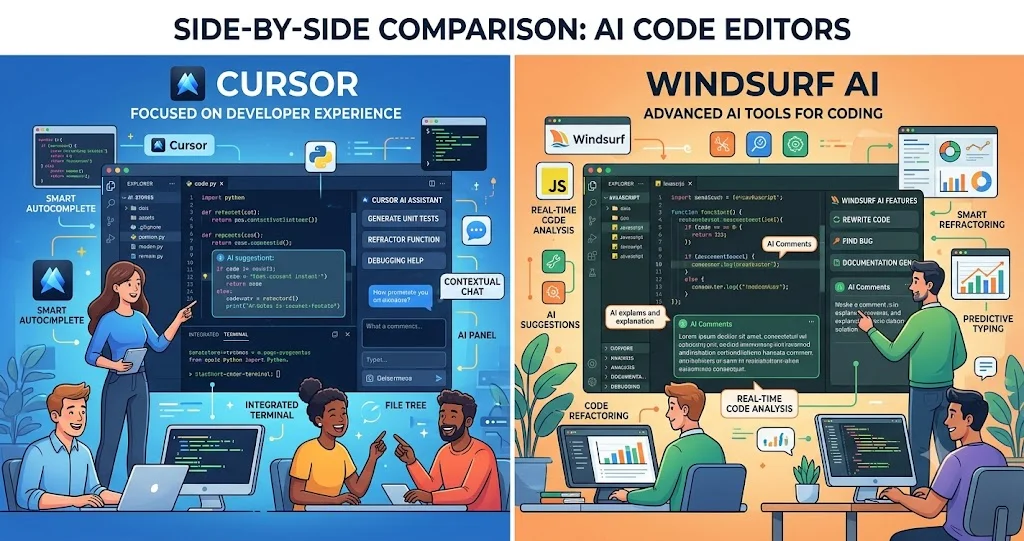
Cursor and Windsurf are no longer just alternatives to traditional autocomplete tools. Both are built around the idea that an AI assistant can understand a codebase, make multi-file changes, use development tools, inspect errors, and help carry out larger software tasks. The more useful question is therefore not simply which editor has better AI, but which workflow fits the way you actually develop software.
Cursor vs Windsurf at a Glance
Cursor and Windsurf overlap heavily in their core capabilities, but their product experiences are different. Cursor's Agent can search a codebase, edit multiple files, execute terminal commands, build features, refactor code, write tests, and work through bugs. Windsurf's Cascade provides Code and Chat modes, planning capabilities, tool access, terminal integration, checkpoints, real-time awareness, and linter integration.
| Area | Cursor | Windsurf |
|---|---|---|
| AI agent | Agent with codebase search, multi-file editing and terminal execution | Cascade with Code/Chat workflows, planning and tool use |
| Autocomplete | AI-assisted Tab completions | Context-aware Windsurf Tab with Tab to Jump and Tab to Import |
| Codebase work | Strong repository exploration and contextual editing | Strong context-aware agent workflow through Cascade |
| Terminal | Agent can run shell commands and use results while working | Cascade integrates terminal tools into agent workflows |
| Model choice | Supports multiple frontier and Cursor models | Offers multiple AI models through Cascade |
| Cloud/remote agents | Cloud Agents are available on qualifying plans | Windsurf integrates local and cloud agent workflows and Devin |
| Individual pricing | Free Hobby, India-specific Start, Pro and higher tiers | Free, Pro and higher team/enterprise tiers |
The table shows why a feature-by-feature winner can be misleading. Both products cover the major requirements of AI-assisted software development. The practical differences appear when you examine how those capabilities are organized into a workflow.
What Is Cursor?
Cursor is an AI-first code editor built around an agent-based development workflow. Its Agent can explore a repository, determine which files are relevant, edit multiple files, run terminal commands, and work toward a requested outcome. Cursor also provides separate workflows for asking questions, planning changes, debugging, and reviewing work.
That makes Cursor particularly useful when the task is larger than generating a function. A developer can ask the agent to understand an unfamiliar project, implement a feature, run checks, investigate an error, and review the resulting changes rather than manually moving between separate AI prompts and development tools.
What Is Windsurf?
Windsurf is an AI-oriented development environment centered around Cascade and Windsurf Tab. Cascade can operate on a codebase, use tools, work with the terminal, plan longer tasks, and help implement changes. Its context-aware design also considers information such as recent editor activity and terminal context.
Windsurf Tab goes beyond traditional autocomplete. Its documented capabilities include inline suggestions, Tab to Jump, Tab to Import, and suggestions informed by code, terminal activity, Cascade history, and recent editor actions. This makes the editor experience particularly focused on keeping the developer in an active coding flow.
AI Code Editing and Autocomplete
Autocomplete remains important even when an AI agent is available. Developers spend much of their day making small changes: completing a function, adding a condition, importing a dependency, filling in a repetitive pattern, or moving between related parts of a file.
Cursor provides AI-assisted Tab completions as part of its editor experience. Windsurf takes a more explicit approach with Tab to Jump and Tab to Import in addition to inline suggestions. Its documentation describes Tab as a context-aware suggestion and navigation engine rather than a simple next-token autocomplete system.
If your workflow is dominated by short coding interactions, compare the tools using your own language, framework, repository style, and editing habits. Autocomplete quality can vary substantially depending on context, so broad claims that one editor is universally better are difficult to justify without a controlled benchmark.
Agentic Coding: Where the Difference Matters Most
The biggest shift in both products is from asking an AI to write code toward asking an AI to complete a development task.
Cursor Agent can search the repository, decide what files to inspect, modify several files, execute shell commands, and verify changes. This makes it suitable for tasks such as adding an API endpoint across several layers, refactoring a shared component, fixing a bug that spans multiple files, or creating tests for an existing feature.
Windsurf's Cascade provides a comparable agentic approach. Its Code mode can create and modify code, execute terminal commands, search and analyze the codebase, install dependencies, and perform multi-step tasks. Its planning workflow is designed to help break complex work into an implementation plan before code is changed.
The practical distinction is therefore less about whether the tools are agentic and more about which agent interaction model you find easier to control and review.
Repository Context and Codebase Understanding
AI coding becomes much more useful when the assistant understands the project instead of treating each file as an isolated prompt.
Cursor's Agent automatically searches the codebase and can be directed toward particular files or folders when more precise context is needed. This is useful for unfamiliar repositories because the developer can ask the agent to identify entry points, important modules, dependencies, or relevant implementation areas before making changes.
Windsurf emphasizes context awareness as a core part of its editor. Cascade can use information from the editor and terminal, while Tab can incorporate recent coding context into suggestions. The result is an experience designed around the idea that the AI should continuously understand what the developer is doing.
For large repositories, however, neither tool eliminates the need for developer judgment. Good repository structure, clear conventions, useful documentation, tests, and well-defined boundaries still improve the quality of AI-generated changes.
Debugging and Error Resolution
Both editors can be useful when debugging requires more than explaining an error message.
Cursor's Agent can investigate a problem, inspect relevant code, run commands, modify files, and verify a potential fix. Cursor also provides a dedicated debugging workflow for issues that require runtime evidence.
Windsurf's Cascade combines codebase analysis with terminal access and can work with errors and linter feedback. Its documented workflow also includes checkpoints and the ability to revert changes, which can be useful when an agent makes several modifications during an investigation.
For production or difficult bugs, the important practice is the same in either editor: require evidence. Ask the agent to reproduce the problem where possible, identify the root cause, make the smallest reasonable change, run relevant tests, and explain what changed. AI-generated fixes should not be accepted simply because the error message disappears.
Terminal and Tool Use
Agentic coding becomes substantially more useful when the AI can interact with development tools instead of only generating text.
Cursor Agent can run terminal commands while working. This allows it to install dependencies, execute tests, inspect command output, run build processes, and use those results to guide subsequent changes.
Windsurf Cascade also has terminal and tool integrations. Its documentation describes tool access for search, analysis, web research, terminal operations, and other development workflows.
For developers who frequently work with CLI-heavy environments, compare the tools on a real repository. Test package installation, test execution, build failures, database-related commands, Git workflows, and framework-specific development commands rather than judging terminal support from a feature checklist alone.
Model Selection
Model selection matters because different coding tasks can benefit from different balances of speed, reasoning ability, context handling, and cost.
Cursor currently provides access to multiple frontier models as well as its own model offerings. Its current pricing documentation separates Cursor Models from a pool for third-party models on eligible plans. This gives users substantial flexibility, although the selected model can affect how quickly included usage is consumed.
Windsurf also provides model selection through Cascade. Developers can choose among available models based on their plan and the task being performed.
Rather than asking which editor has the single best model, a more useful evaluation is whether the editor gives you the models, controls, and usage economics you need for your workload.
IDE Experience and Developer Flow
Cursor is designed as an AI-first editor while retaining the conventions developers expect from a modern code editor. Its workflow combines editing, agent interaction, planning, debugging, code review, integrations, and cloud agents.
Windsurf places particularly strong emphasis on flow. Cascade, context awareness, Tab suggestions, terminal integration, previews, workflows, and related capabilities are designed to reduce the amount of context switching required during development.
This difference is subtle but important. Developers who prefer to explicitly initiate larger AI tasks may find Cursor's Agent-oriented workflow natural. Developers who want AI assistance to remain closely connected to their current editor activity may prefer Windsurf's context-focused experience.
Collaboration and Team Development
For individual developers, the most important concerns are usually coding quality, context, agent reliability, model access, and usage limits. Teams add another layer: centralized billing, administration, access control, analytics, security, and consistent development practices.
Cursor offers team-oriented plans with centralized administration and enterprise controls. Windsurf also provides Teams and Enterprise options with capabilities such as centralized management, analytics, SSO, access controls, and prioritized support.
For a team evaluation, do not compare only the individual subscription price. Review the administrative model, identity controls, data-handling requirements, supported integrations, usage limits, and how easily the organization can establish common AI-development rules.
Cursor vs Windsurf Pricing
Pricing changes frequently, so the figures below should be treated as a current snapshot rather than a permanent comparison.
| Tool | Current individual pricing found | Important pricing consideration |
|---|---|---|
| Cursor | Hobby free; Start ₹649/month in India; Pro $20/month; higher individual tiers available | Usage is divided between Cursor Models and other model pools on eligible plans; model selection affects consumption |
| Windsurf | Free; Pro $15/month; higher Teams and Enterprise options | Pro includes a monthly prompt-credit allocation, with additional credits available separately |
Cursor's current documentation lists a ₹649/month Start plan specifically for developers in India, while its Pro plan is listed at $20/month. Windsurf documentation currently lists Pro at $15/month with 500 prompt credits per month. Because usage systems differ, comparing the headline subscription price alone does not establish which tool is cheaper for a particular developer.
Which Tool Is Better for Different Developers?
Choose Cursor if you prefer a structured agent workflow
Cursor may be a strong fit if your typical tasks involve multi-file implementation, repository exploration, refactoring, debugging, test generation, and deliberate review of agent changes. Its Agent, planning, debugging, code review, model selection, and cloud-agent ecosystem make it well suited to developers who want AI to handle substantial chunks of implementation while keeping the developer responsible for review.
Choose Windsurf if you prioritize continuous coding flow
Windsurf may appeal more if you want the AI closely connected to your current editor activity. Cascade combines agentic coding with context awareness, terminal access, planning, and workflows, while Windsurf Tab adds context-sensitive coding suggestions and navigation.
Choose based on price and usage if you are an individual developer
If subscription cost is a major factor, the current plans are materially different. Windsurf Pro is listed at $15/month, while Cursor Pro is listed at $20/month. Developers in India also have access to Cursor Start at ₹649/month. But the real comparison should include how often you use agents, which models you select, whether you need premium models, and whether you consume additional usage.
For teams, evaluate administration rather than just AI features
For an engineering organization, the better tool is the one that satisfies both developer workflow requirements and organizational requirements. Compare SSO, access controls, analytics, billing, data governance, integrations, support, and usage management alongside coding capabilities.
A Practical 30-Minute Evaluation
If you are choosing between Cursor and Windsurf, a short hands-on test is more useful than reading dozens of feature lists.
- Use the same repository: Choose a real project that contains multiple modules and enough complexity to expose context problems.
- Test code understanding: Ask each tool to explain the architecture, identify entry points, and trace one important feature through the codebase.
- Test a multi-file change: Give both tools the same small feature request and compare the files they identify, the implementation, and the amount of manual correction required.
- Test debugging: Introduce or use a known bug and ask each tool to identify the root cause, implement a fix, and run the relevant tests.
- Test autocomplete: Write representative code in your normal stack and compare suggestions during everyday editing rather than a synthetic benchmark.
- Measure review effort: Count how much time you spend correcting AI-generated code. A tool that generates more code is not necessarily more productive if it requires more review.
- Check usage economics: Record which models you use and how quickly your plan allowance is consumed during normal development.
The Metrics That Actually Matter
Developer productivity should not be measured only by lines of code or the number of AI prompts. More useful measures include time from issue assignment to reviewed pull request, percentage of generated changes accepted with minimal modification, test pass rate, time spent debugging AI-generated changes, review effort, frequency of reverted AI changes, and developer satisfaction.
For teams, add operational measures such as cycle time, escaped defects, code-review duration, build success rate, and the percentage of tasks that can be completed without repeated prompting.
The best AI coding editor is therefore the one that reduces total development effort while maintaining acceptable code quality and review standards.
What Neither Tool Replaces
AI coding agents can make substantial changes, but they do not remove the need for software engineering judgment. Developers still need to understand requirements, architecture, security, data handling, testing, dependency choices, performance constraints, and deployment risks.
This matters especially when an agent can execute terminal commands or modify many files. The more autonomy an AI tool has, the more important it becomes to review diffs, run tests, protect secrets, restrict dangerous commands, and use version control so changes can be inspected or reverted.
Final Verdict: Cursor or Windsurf?
There is no evidence-based reason to declare one of these editors the universal winner. Cursor and Windsurf have converged around many of the same capabilities: codebase-aware assistance, agentic editing, terminal use, multiple models, planning, and AI-assisted developer workflows.
Cursor is a compelling choice for developers who want a structured agent workflow with strong repository exploration, multi-file implementation, debugging, model flexibility, and cloud-agent capabilities. Windsurf is compelling for developers who value Cascade's integrated agent workflow and a highly context-aware editing experience built around staying in flow.
If you are deciding today, test both against the same real project. Compare completed work, correction time, review effort, test results, model usage, and subscription consumption. The better editor is not the one with the longest feature list; it is the one that helps you complete your actual software work with less friction and without lowering engineering quality.
Frequently Asked Questions
Is Cursor better than Windsurf for coding?
Neither is universally better. Cursor may suit developers who prefer its Agent-centered workflow, while Windsurf may suit developers who prefer Cascade and its context-aware editor experience. The best choice depends on your projects, coding style, preferred models, and usage patterns.
Can Cursor and Windsurf edit multiple files?
Yes. Both tools provide agentic workflows capable of making changes across multiple files. The exact behavior depends on the task, model, context, and permissions available to the agent.
Which is better for large codebases?
Both are designed to work with codebases rather than isolated snippets. For a large repository, the better choice should be determined through a real project test that measures context accuracy, navigation, implementation quality, and review effort.
Which has better AI autocomplete?
Both provide AI-assisted coding suggestions. Windsurf's Tab includes context-aware features such as Tab to Jump and Tab to Import, while Cursor provides AI-assisted Tab completions. Personal results can vary considerably by programming language, repository, and coding style.
Which is cheaper, Cursor or Windsurf?
Current individual pricing lists Windsurf Pro at $15/month and Cursor Pro at $20/month. Cursor also offers a ₹649/month Start plan specifically for developers in India. However, usage limits and model economics differ, so the lower subscription price does not automatically mean lower total cost.
Can both tools use different AI models?
Yes. Both provide model-selection capabilities, although the exact available models and usage rules depend on the current plan. Developers should check the official pricing and model documentation before making a purchasing decision.
Should a development team use Cursor or Windsurf?
Teams should evaluate more than coding quality. Compare administration, identity and access controls, analytics, billing, security requirements, supported integrations, usage limits, and the developer experience with the team's actual repositories.