
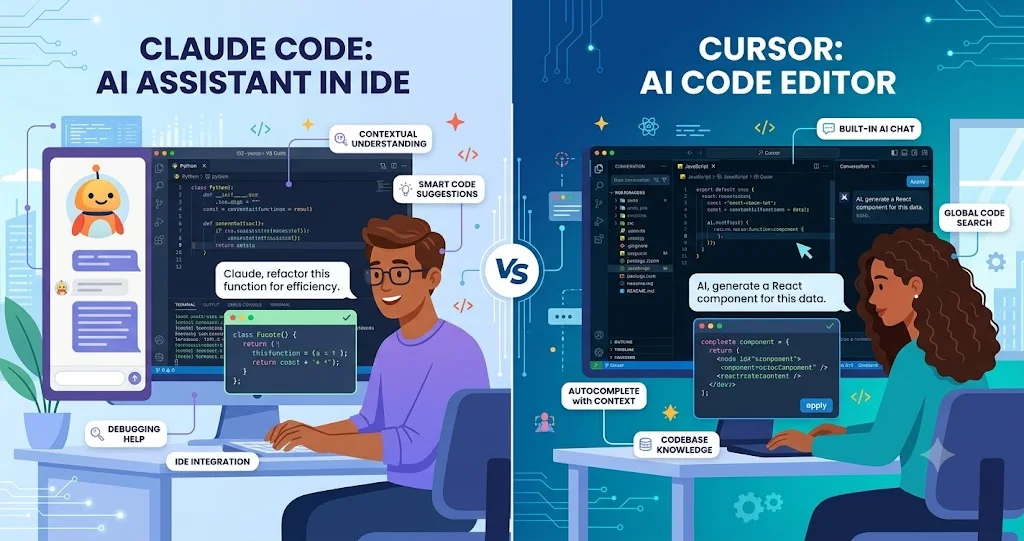
The most useful way to compare Claude Code and Cursor is not to ask which one has the better AI. The more important question is where you want the AI coding agent to live in your development workflow. Claude Code is built around the terminal and repository-level tasks, while Cursor combines an AI-native editor with agents, codebase search, terminal execution, planning, and multiple model options. Both can generate code, modify multiple files, debug problems, and run development commands, but they encourage different ways of working.
Claude Code vs Cursor at a glance
Claude Code is a command-line development agent from Anthropic. You launch it from a project directory and give it tasks such as understanding a repository, implementing a feature, investigating an error, modifying files, or running checks. Anthropic also documents non-interactive CLI usage, scripting, MCP integration, permission controls, and model selection, which makes Claude Code particularly suitable for developers who already organize their work around terminals, Git, shell commands, and automation.
Cursor is an AI-first code editor whose Agent can search a codebase, edit multiple files, execute terminal commands, fix errors, build features, refactor code, and write tests. Its workflow keeps the developer inside an editor where changes can be reviewed through diffs, while features such as Plan mode provide a structured path for larger changes.
| Area | Claude Code | Cursor |
|---|---|---|
| Primary workflow | Terminal and repository centered | AI-native editor centered |
| Agentic coding | Strong repository and terminal workflow | Strong multi-file editor and terminal workflow |
| IDE experience | CLI-first, with editor integrations available | Core part of the product |
| Repository context | Repository files, instructions, tools and MCP | Automatic codebase search plus explicit file/folder context |
| Terminal automation | Central to the workflow | Integrated into Agent workflows |
| Model choice | Primarily Claude models | Multiple frontier model providers and Cursor models |
| Automation potential | Strong CLI, scripting and CI-oriented possibilities | Strong editor, cloud-agent and workflow integrations |
| Best fit | Terminal-first developers and automation-heavy workflows | Developers who want an AI-native coding environment |
What is Claude Code?
Claude Code is Anthropic's command-line coding agent. Its basic workflow is intentionally close to normal software development: open a terminal, move into the repository, start Claude Code, describe the task, and review what the agent changes. Anthropic documents support for reading and editing project files, running commands, continuing sessions, selecting models, controlling permissions, and configuring MCP servers.
This makes Claude Code less dependent on a particular editor. A developer can keep using an existing IDE, terminal, Git workflow, development container, or other engineering environment and bring Claude Code into that workflow. It can also be invoked non-interactively, which is important when AI assistance needs to become part of a script or automation pipeline.
What is Cursor?
Cursor is an AI coding environment built around an editor. Its Agent can inspect a repository, decide which files matter, edit multiple files, execute terminal commands, and iterate based on the results. Cursor also provides Ask, Plan, and Debug-oriented workflows so developers can choose whether they want explanation, planning, implementation, or investigation.
The distinction matters because Cursor is not simply an editor with an autocomplete feature added to it. Its current documentation describes Agent as a combination of a model, tools such as file editing and terminal execution, and a harness that supplies instructions and context.
Terminal-based development vs IDE-based development
Claude Code: terminal-first
Claude Code fits naturally into a terminal-centered workflow. A developer can ask it to inspect a project, investigate a failing test, modify files, run commands, review Git information, or continue an earlier session. The CLI also supports print mode, structured output formats, maximum-turn limits, permission modes, and explicit tool controls. These features make the terminal more than just an alternative interface; it becomes part of the automation model.
This is especially useful for developers who already work heavily with Git, Docker, shell scripts, remote servers, CI systems, and command-line tooling.
Cursor: editor-first
Cursor keeps more of the workflow visible in the editor. Agent changes appear in the project, developers can inspect diffs, and the same environment can be used for reading code, asking questions, planning changes, implementing features, and running verification commands. Cursor's documentation specifically recommends reviewing the resulting diff and running the project's existing checks after Agent changes.
For developers who spend most of the day inside an IDE, this can reduce context switching. You do not need to move from an AI chat to a separate terminal to see the files being changed; the agent operates within the same development environment.
Agentic coding and multi-file changes
Both tools are designed for agentic development rather than only line-by-line suggestions. The difference is mainly in how that agent fits into the workflow.
Claude Code can take a high-level task and use repository files, terminal commands, tools, and configured instructions to work toward the result. Its CLI also exposes controls for agentic turns, permissions, model selection, and automation.
Cursor Agent similarly takes a task, searches the codebase, determines relevant files, edits them, runs commands, and uses the results to continue. Cursor explicitly positions Agent for building features, refactoring, fixing bugs, and writing tests.
For a task such as “add role-based authorization to this existing application, update the API, add tests, and fix compilation errors,” either product can operate at the repository level. The practical difference is that Claude Code makes the terminal and command execution central, while Cursor makes the editor, diff view, and interactive development environment central.
Repository context and project instructions
Repository context is one of the most important factors in AI-assisted development. An agent that understands the structure, conventions, dependencies, and existing implementation can make substantially more useful changes than one that only sees the current file.
Claude Code supports project-specific instructions through CLAUDE.md files. Anthropic documents these files as a way to provide architecture information, coding standards, common workflows, and project commands. It can also import additional instruction files and maintain user-level instructions.
Cursor's Agent automatically searches the repository when working on a task, and developers can explicitly provide files or folders as additional context. Its documentation also describes codebase search as a core Agent capability.
The practical difference is subtle but important. Claude Code gives terminal-oriented developers a clear convention for repository instructions that can become part of the project's development workflow. Cursor gives developers a more interactive context-selection experience directly inside the editor.
Code generation, refactoring, and debugging
Code generation
Both products can implement features rather than merely suggest snippets. The quality of generated code depends on the model, the task description, repository context, project instructions, and how carefully the developer reviews the result.
Cursor gives developers access to models from multiple providers in addition to Cursor's own model offerings. Its current documentation lists Anthropic, OpenAI, Google, xAI, and Cursor models, with the available selection depending on the plan and usage pool.
Claude Code is centered on Anthropic's Claude models, with model selection exposed through the CLI. Anthropic also documents enterprise options involving cloud providers and model gateways.
Refactoring
For large refactors, the important capability is not simply generating code. The agent needs to find all affected files, understand dependencies, modify related components consistently, and verify the result.
Cursor's Agent is explicitly designed for multi-file changes and refactoring. Claude Code can approach the same work through repository exploration and terminal commands. In either environment, developers should treat the agent as an implementation partner rather than an automatic approval system: inspect the diff, run tests, and check architectural consequences.
Debugging
Debugging is where agentic workflows become more useful than traditional autocomplete. Instead of asking for a replacement line, the developer can give the agent an error, failing test, stack trace, or reproduction command and ask it to investigate.
Cursor provides a dedicated Debug workflow for difficult bugs and can run commands while investigating. Claude Code can use the terminal to reproduce problems, inspect output, edit code, and rerun checks.
Testing and verification
Neither product should be evaluated solely by how quickly it produces code. A stronger test is whether the agent can move from implementation to verification.
Cursor's documented workflow encourages developers to ask the agent to run the project's type checker, linter, tests, or local build after changes. Its Agent can execute terminal commands and use the results to continue working.
Claude Code's terminal-first architecture makes the same pattern natural: ask it to implement a change, run the project's checks, investigate failures, and continue until the expected verification succeeds. Its CLI provides options such as non-interactive print mode and maximum agentic turns, which can also be useful when integrating coding tasks into automation.
The important limitation is the same for both: passing tests does not prove that an AI-generated change is architecturally correct, secure, or appropriate for the product. Human review remains necessary for significant changes.
Model access: Claude-centered vs multi-model
This is one of the clearest differences between the products.
Claude Code is tightly connected to Anthropic's Claude model ecosystem. For users on Claude plans, Claude Code is included with qualifying Pro and Max subscriptions, while API-based usage is another billing path. Anthropic's current help documentation lists Pro at $20 per month and Max tiers at $100 and $200 per month, with Claude and Claude Code usage sharing plan limits.
Cursor takes a broader model-selection approach. Its current documentation says it supports frontier models from multiple providers and separates usage into Cursor Models and Other Models pools. The available models and usage limits depend on the plan.
For developers who specifically want a Claude-centered workflow, Claude Code is the more direct choice. For developers who want to compare models inside the same coding environment, Cursor offers a broader model-selection experience.
Automation, MCP, and developer tooling
Claude Code has a particularly strong story for terminal automation. Its CLI supports non-interactive operation, structured JSON output, tool permissions, session continuation, and MCP configuration. That makes it suitable for workflows where an AI coding task needs to become part of a repeatable command or engineering process.
Anthropic also documents MCP as a standardized way to connect Claude Code to external tools and data sources.
Cursor takes a broader integrated-workspace approach. Its current platform supports MCP servers, plugins, skills, hooks, cloud agents, and integrations with development and project-management tools.
So the distinction is not “automation versus no automation.” Both support extensible workflows. Claude Code is particularly natural when automation starts from the command line, while Cursor is attractive when automation is part of a larger AI-native editor and cloud-agent workflow.
Developer experience and customization
Claude Code tends to feel familiar to developers who prefer explicit commands and composable tools. You can see the working directory, issue shell commands, control permissions, configure tools, and incorporate the agent into existing scripts.
Cursor is more visual and interactive. The developer sees the repository, edits, diffs, agent conversation, and development tools in one environment. Plan mode is useful when a change is too large to implement safely in one conversational step because it lets the developer review an approach before implementation.
This leads to an important practical distinction: Claude Code is easier to think of as an AI developer you invoke from your development environment, while Cursor is easier to think of as a development environment in which an AI developer is embedded.
Current pricing: Claude Code vs Cursor
Pricing changes frequently, so current plan pages are more reliable than older comparison articles.
| Product | Current individual pricing relevant to developers | Important consideration |
|---|---|---|
| Claude Code | Claude Pro: $20/month; Max: $100 or $200/month | Claude and Claude Code share usage limits under Pro/Max; API usage is a separate option. |
| Cursor Start | ₹649/month in India, tax inclusive | Designed for daily agentic development with Cursor's included model pool; it does not include the separate Other Models pool. |
| Cursor Pro | $20/month | Includes broader model access and higher Agent usage than lower-tier plans. |
Anthropic's documentation currently lists Pro at $20/month and Max at $100 or $200/month for Claude Code access. Anthropic also explains that Pro and Max usage limits are shared between Claude and Claude Code.
Cursor currently lists an India-only Start plan at ₹649/month, tax inclusive, while its Pro plan is listed at $20/month. Cursor explains that Start covers the Cursor Models pool but not the separate Other Models pool or some higher-tier capabilities.
Price alone therefore does not determine the cheaper workflow. Usage limits, model selection, task size, and how frequently you use agentic features can have a greater effect on the practical value of a plan.
Which workflow is Claude Code better suited to?
- Terminal-first development: Developers who already work primarily through shells, Git, containers, and command-line tools.
- Automation: Teams that want AI coding tasks to participate in scripts, command pipelines, or repeatable engineering workflows.
- Repository-wide tasks: Developers who prefer asking an agent to inspect and modify a project rather than working mainly through inline editor suggestions.
- Anthropic-centered workflows: Developers who specifically want to work with Claude models and Claude Code together.
- Existing IDE flexibility: Developers who do not want to replace their preferred editor just to use an AI coding agent.
Which workflow is Cursor better suited to?
- IDE-centered development: Developers who want coding, AI assistance, diffs, planning, and terminal access in one environment.
- Multi-model workflows: Developers who want access to models from different providers through the same coding environment.
- Interactive refactoring: Engineers who want to inspect agent changes immediately and iterate through an editor-based workflow.
- AI-native development: Teams interested in cloud agents, MCP, skills, plugins, hooks, and integrated development workflows.
- Developers who prefer visual context: People who find repository navigation and code review easier inside an IDE than through a terminal.
Beginners vs experienced developers
For beginners
Cursor may have the easier starting point for a beginner who wants an integrated environment. The editor provides a visible project structure, AI interaction, file changes, diffs, and terminal access in one place. That can make it easier to understand what the agent is doing and where changes are being made.
However, beginners should not treat either product as a replacement for learning software fundamentals. AI-generated code can compile while still containing poor architecture, incorrect assumptions, security weaknesses, or unnecessary complexity. Learning how to read diffs, run tests, understand dependencies, and review generated code is essential.
For experienced developers
The decision becomes more workflow-dependent. An experienced engineer who already lives in the terminal may prefer Claude Code because it can operate without forcing a change to the existing development environment. An engineer who wants a tightly integrated AI editor and broader model choice may prefer Cursor.
For senior developers and teams, the more useful evaluation is therefore not “which has better autocomplete?” but “which agent fits the way our repository is built, tested, reviewed, and deployed?”
Technical limitations to consider
Both products share the fundamental limitations of AI coding agents. An agent can misunderstand business requirements, make an incorrect architectural assumption, modify too many files, introduce subtle regressions, or stop after reaching a superficially successful state.
Large repositories also create a context-management problem. An agent cannot simply reason perfectly about every line of a large codebase at once. Repository search, project instructions, focused prompts, and incremental tasks help reduce that problem, but they do not eliminate it.
Model selection introduces another variable. Cursor's multi-model approach gives developers more choice, but model differences can make behavior less predictable from one model to another. Claude Code's tighter model ecosystem simplifies that choice but gives users less reason to treat the product as a neutral model-comparison environment.
Automation also requires caution. Giving an agent permission to execute commands or modify files increases its usefulness but also increases the consequences of a bad instruction or incorrect decision. Permission controls, code review, tests, and sensible repository boundaries remain important.
A practical way to choose between Claude Code and Cursor
If you are unsure, compare the products using the same repository and the same five tasks rather than relying on generic feature lists.
- Repository understanding: Ask both tools to explain the architecture, main entry points, important dependencies, and test strategy.
- Feature implementation: Give both the same multi-file feature request and compare the resulting changes.
- Debugging: Provide the same reproducible failure and see whether each agent can identify the root cause and verify the fix.
- Refactoring: Ask both to make a controlled architectural improvement without changing external behavior.
- Testing: Require both to run the project's actual tests, type checks, linting, or build process and explain any failures.
Then evaluate the things that matter to your team: quality of changes, amount of supervision required, ease of reviewing diffs, model flexibility, terminal integration, automation options, usage limits, and total cost.
Claude Code vs Cursor: the practical verdict
Claude Code and Cursor are best understood as two different interfaces for increasingly capable coding agents. Claude Code is the stronger conceptual fit for a terminal-first developer who wants an agent that can participate in an existing command-line and automation workflow. Cursor is the stronger conceptual fit for a developer who wants the editor itself to become an AI-native development environment.
Neither choice automatically produces better software. The quality of the repository context, task specification, model, verification process, and human review can matter as much as the product selected.
If your ideal workflow sounds like “open the repository, run an agent, let it inspect files and commands, automate parts of the process, and keep my existing tools,” Claude Code is a natural fit. If it sounds like “open an AI-native editor, plan a feature, let an agent search and modify the codebase, inspect the diff, switch models when useful, and continue from the same workspace,” Cursor is likely the better fit.
FAQ
Is Claude Code an IDE?
Claude Code is primarily a command-line coding agent rather than a standalone IDE. It operates from a project directory and can work alongside an existing editor or development environment. Anthropic's documentation emphasizes its CLI, repository access, tools, permissions, and automation capabilities.
Is Cursor only an AI autocomplete tool?
No. Cursor includes autocomplete-style features, but its Agent can search the codebase, edit multiple files, run terminal commands, implement features, refactor code, fix bugs, and write tests.
Can Claude Code and Cursor both work on existing repositories?
Yes. Both are designed to work with existing codebases. Claude Code is launched from a project environment and can inspect and modify repository files, while Cursor's Agent searches the project and uses repository context when implementing tasks.
Which has more model choices?
Cursor currently provides access to models from multiple providers as well as Cursor models. Claude Code is centered on Anthropic's Claude models, with model selection available within its CLI.
Is Claude Code cheaper than Cursor?
There is no universal answer because the plans use different usage models. Claude Code is included with qualifying Claude Pro and Max subscriptions, while Cursor has its own plans and usage pools. As of September 2026, Anthropic lists Pro at $20/month and Max at $100 or $200/month, while Cursor lists an India-only Start plan at ₹649/month and Pro at $20/month.
Which is better for debugging?
Both can investigate bugs by reading code, running commands, changing files, and checking results. Cursor has an explicitly documented Debug workflow, while Claude Code's terminal-oriented workflow makes reproducing errors and running diagnostic commands a central part of the interaction.
Which is better for automation?
Claude Code has a particularly natural fit for terminal and script-based automation because its CLI supports non-interactive operation, structured output, permission controls, and MCP configuration. Cursor also supports extensibility through MCP, plugins, skills, hooks, and cloud agents.
Should experienced developers use both?
They can. Developers may prefer an editor-centered tool for interactive implementation and another agent for terminal-based automation or specific tasks. The main consideration is whether the additional tool improves the workflow enough to justify another model interface, subscription, and context-management process.