

50 ChatGPT Prompts That Make Everyday Work Easier
ChatGPT has become an essential tool for many professionals. But its value depends significantly on how you ask questions. This guide offers 50 practical prompts that are designed to simplify everyday work tasks, from email writing and meeting preparation to project planning and creative thinking.
Introduction: The Power of Well-Crafted Prompts
A good prompt is the key to getting useful responses from ChatGPT. The 50 prompts in this guide are structured to be clear, specific, and actionable, designed to save time and boost productivity. They are organized by the type of task they address, making it easy to find what you need. Whether you are a professional, entrepreneur, student, or anyone looking to improve daily efficiency, these prompts offer a practical way to leverage AI in your routine.
Communication and Email
These prompts help streamline communication, making email and message drafting faster and more effective.
- 1. 'Draft a professional email to my team about the upcoming project deadline, including a clear timeline and action items.'
- 2. 'Write a polite follow-up email to a client who hasn't responded to my previous email about our proposal.'
- 3. 'Create a template for a weekly status report email for my manager.'
- 4. 'Compose a diplomatic email declining a meeting request due to a schedule conflict.'
- 5. 'Generate a response to a customer complaint about a delayed shipment, expressing empathy and offering a solution.'
- 6. 'Craft a concise and professional email to a potential client introducing our services.'
- 7. 'Draft an internal memo announcing a new company policy on remote work.'
- 8. 'Create a clear and actionable email for a virtual meeting agenda.'
- 9. 'Write a thank-you note to a colleague who helped me with a project.'
- 10. 'Generate a LinkedIn message to request an informational interview with a professional in my field.'
Meeting and Scheduling
These prompts help prepare for and follow up on meetings more efficiently, saving time and improving meeting outcomes.
- 11. 'Create a meeting agenda for a 30-minute project kickoff meeting, with time allocations for each topic.'
- 12. 'Generate a list of questions to ask a potential vendor during a discovery call.'
- 13. 'Summarize the key points from the meeting notes I am about to paste here [Insert notes].'
- 14. 'Draft a follow-up email after a meeting, summarizing action items and assigning responsibilities.'
- 15. 'Create a template for meeting minutes for a recurring team sync meeting.'
- 16. 'Generate a list of potential talking points for an upcoming performance review meeting with my manager.'
- 17. 'Compose a polite message to reschedule a meeting with a client.'
- 18. 'Draft an agenda for a brainstorming session with my team.'
- 19. 'Create a decision-making framework for a meeting where we need to choose between two competing strategies.'
- 20. 'Generate a post-meeting survey to collect feedback on the session's effectiveness.'
Writing and Content Creation
These prompts assist with drafting, editing, and improving various types of content.
- 21. 'Write a blog post introduction about the topic: [Insert topic]. The introduction should be engaging and include a clear thesis.'
- 22. 'Rewrite the following paragraph to be more concise and impactful: [Insert paragraph].'
- 23. 'Generate 5 headline options for a blog post about [Insert topic].'
- 24. 'Create an outline for a 1000-word article on [Insert topic] with a clear introduction, body, and conclusion.'
- 25. 'Revise the following text to make it more persuasive for a professional audience: [Insert text].'
- 26. 'Draft a social media post (LinkedIn) based on this article I'm sharing: [Insert summary/headline].'
- 27. 'Write a case study summary for a project that achieved [Insert result].'
- 28. 'Create a content calendar for the next month on the topic of [Insert topic].'
- 29. 'Generate a list of frequently asked questions (FAQ) about [Insert topic].'
- 30. 'Write a compelling call to action for my newsletter.'
Planning and Project Management
These prompts support project planning, task management, and strategic thinking.
- 31. 'Create a project plan for developing a new website, including phases, timelines, and key deliverables.'
- 32. 'List the steps I need to take to launch a new product, from concept to market.'
- 33. 'Generate a risk assessment for a project involving [Insert details], identifying potential risks and mitigation strategies.'
- 34. 'Outline a budget for a marketing campaign on a limited budget.'
- 35. 'Create a task list for the week, organized by priority, for a project manager role.'
- 36. 'Develop a timeline for completing my upcoming quarterly goals.'
- 37. 'Generate a list of resources needed for a successful event planning project.'
- 38. 'Create a communication plan for a change management initiative in my organization.'
- 39. 'Write a project post-mortem report outlining what went well and what could be improved.'
- 40. 'Generate an elevator pitch for my new business idea.'
Creativity and Problem Solving
These prompts are designed to stimulate creative thinking and help overcome challenges.
- 41. 'Generate 10 new product ideas for a health-conscious consumer market.'
- 42. 'Brainstorm solutions to the problem of [Insert problem]. List at least 5 diverse approaches.'
- 43. 'Generate a list of ways to improve team morale and productivity in a remote work environment.'
- 44. 'Come up with a creative name and tagline for a new application focused on mindfulness and productivity.'
- 45. 'Provide innovative suggestions for a more sustainable approach to [Insert industry/process].'
- 46. 'Think outside the box: how can I improve the customer onboarding experience?'
- 47. 'Generate a fun icebreaker activity for a team-building meeting.'
- 48. 'Offer unconventional marketing ideas for a small local business.'
- 49. 'What are some ways to reduce waste in my daily work routine?'
- 50. 'Imagine a future trend that could disrupt my industry. Describe it and its potential impact.'
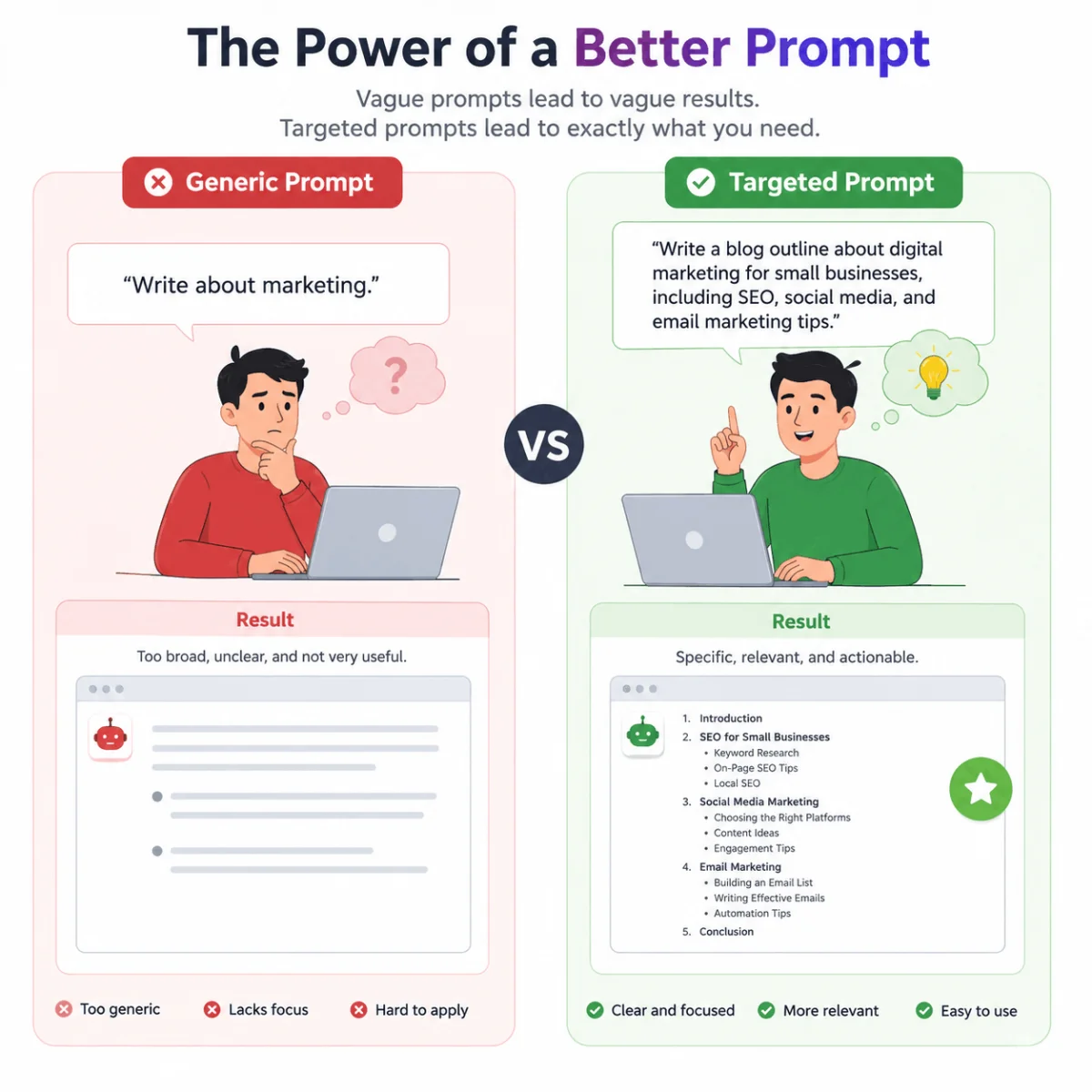
Comparison of Prompting Styles
The following table compares different prompting styles, illustrating how the structure of a prompt can influence the quality of ChatGPT's response.
| Style | Example | Best For | Pros | Cons |
|---|---|---|---|---|
| Open-Ended | 'Tell me about project management.' | Broad information gathering | Flexible, easy to use | May produce generic, unfocused responses |
| Structured | 'List 3 key phases of project management, each with a brief description and a common challenge.' | Specific, organized information | Clear, actionable, focused | May be more work to craft |
| Role-Based | 'Act as an experienced project manager and advise me on how to handle a delayed project milestone.' | Expert perspective | Tailored advice, specific tone | May rely on generalized roles |
| Step-by-Step | 'Explain the process of setting up a project plan step-by-step.' | Procedural tasks, learning | Clear, easy to follow | May oversimplify complex steps |
Checklist: Evaluating Your Prompts
Use this checklist to assess and improve the prompts you create for ChatGPT.
- Is the prompt clear? Could you get the response you want without extra explanation?
- Is it specific enough? Does it guide ChatGPT toward a precise outcome?
- Does it include necessary context? Have you provided relevant background information?
- Is it actionable? Will the response be useful and applicable?
- Is the request reasonable? Does it align with ChatGPT's capabilities?
Tips for Getting the Most from ChatGPT
These tips can help you refine your approach to using ChatGPT and improve the quality of responses you receive.
- Be Specific: The more detail you provide, the more useful the response.
- Use Follow-Up Prompts: Don't hesitate to ask clarifying questions or request a revised version of the response.
- Provide Examples: Mentioning examples of what you are looking for helps guide the AI.
- Refine Iteratively: Use the first response as a starting point and adjust your prompt based on the result.
- Maintain Context: Keep conversation threads to provide continuity if you are working on related tasks.
Frequently Asked Questions About ChatGPT Prompts
Are these prompts for ChatGPT or other AI tools?
The prompts are designed for ChatGPT, but many are adaptable to other conversational AI tools with similar capabilities.
How can I make my prompts more effective?
Be specific, provide context, and use examples. Structure your prompt and iterate based on the responses you receive.
Can ChatGPT generate code with prompts?
Yes, ChatGPT can generate code with appropriate prompts. However, review the generated code carefully for accuracy and security.
Is it okay to use these prompts for professional work?
Yes, these prompts are designed to help professionals be more productive. They serve as starting points to be customized.
Why do I sometimes get generic answers from ChatGPT?
Generic answers often result from vague prompts. Try making your prompt more specific and providing more context.
Can I save these prompts for reuse?
Yes, saving effective prompts for future use is a good practice. Consider organizing them for different tasks.
Are these prompts suitable for beginners?
Yes, the prompts are designed to be user-friendly and accessible for beginners.
How can I get creative responses from ChatGPT?
Use open-ended prompts, ask for multiple suggestions, or request responses from different perspectives (e.g., 'Act as a ...') to encourage creativity.
Conclusion
The 50 prompts in this guide offer a practical starting point for integrating ChatGPT into your daily work. By learning how to frame clear, effective prompts, you can save time and improve the quality of your output across many tasks. Whether you are managing projects, communicating with colleagues, or generating creative ideas, thoughtful prompts can help you get the most out of ChatGPT. Use them as a starting point, adapt them to your needs, and continue to refine your approach as you discover what works best for you.